


Cookie scanning vs script blocking: what’s the difference?
Your site passed a cookie scan last month, and yesterday someone added a new advertising pixel. What protects today’s visitors?
Cookie scanning finds cookies and trackers on the pages and in the conditions it inspects. Script blocking controls whether scripts may run before and after a visitor’s choice. One gives you visibility; the other changes behavior.
Neither proves on its own that the website does what visitors chose. That takes a third job: checking the behavior in a browser.
| Activity | What it does | When it happens | What it cannot prove alone |
|---|---|---|---|
| Cookie scanning | What it doesVisits pages and lists the cookies and trackers it detects. | When it happensOn a schedule, or when you start a scan. | What it cannot prove aloneThat a tool is absent from unscanned pages, logins or interactions. |
| Script blocking | What it doesHolds scripts back until the visitor allows the relevant category. | When it happensOn every page view, from the first visit. | What it cannot prove aloneThat every installation route is covered, or every category is right. |
| Manual verification | What it doesTests real journeys and compares expected with observed behavior. | When it happensAfter website changes and before important launches. | What it cannot prove aloneAnything beyond the pages, choices and browsers you tested. |
Follow a new pixel between two scans
Imagine a fictional shop preparing a campaign. A marketer adds a remarketing pixel to the website theme. The next automatic scan is not due for three weeks.
If the pixel is covered by the site’s blocking setup, it follows the relevant consent choice from the first page view. If it is not covered, it may run for weeks before a scan finds it. A visible banner does not answer that question.
The next scan can help identify the tool. Someone still needs to confirm its purpose, configuration and disclosure: calling the cookie “marketing” in a report does not stop the request.
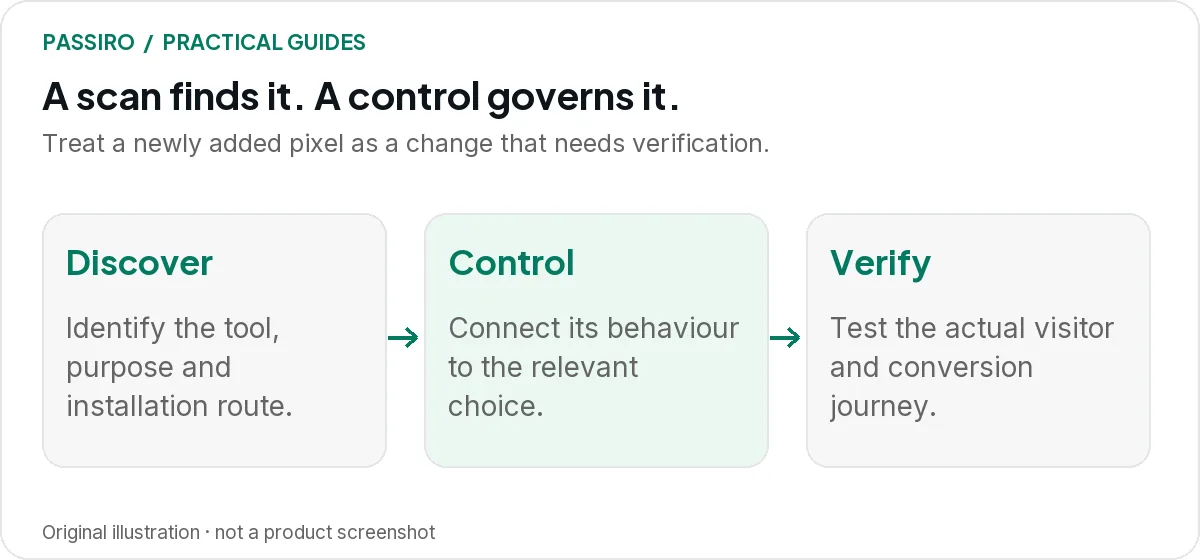
Identify, connect, test: the order for every new tool
- Identify the tool. Record its provider, purpose, owner, the pages it runs on and how it is installed: theme code, plugin, tag manager or embedded frame.
- Connect it to the relevant consent choice. Give it the category that matches what it does, and make sure the blocking or tag manager rule for its installation route enforces that category.
- Test the behavior. In fresh browser sessions, check before any choice, after rejection and after acceptance, then complete one real interaction, such as a test purchase.
For the fictional shop, the pixel is finished when those three steps are done, not when its code is pasted. Use the Reject all test guide for step three; the output should be a short record of what happened, not a screenshot of the banner.
After release, the next scan confirms what the crawler sees and keeps your cookie information current. It is a check on the process, not the first line of control.
What a scan is good at
A scan is useful for building and refreshing an inventory. It can surface a tracker you forgot about or show that an old plugin still loads third-party services.
Review the results with questions that lead to action:
- Do we still need this tool?
- Who added it, and where is it installed?
- Is its category right for what we use it for?
- Does our cookie information describe it accurately?
- Which visitor journeys need a manual test?
A long report with no owner is easy to ignore. Assign each finding to someone who can remove, configure or investigate the tool.
What a scan cannot prove
A crawler sees a bounded set of pages and interactions. It may not reach a logged-in account, a checkout after several steps or a widget that appears only in a particular region.
Treat “not detected” as a statement about that scan, not a guarantee about the whole website. A 500-page allowance can be useful, but page count alone does not tell you whether the decisive interaction was tested.
Compare the scan scope with your most important visitor journeys. In Passiro, Scan History shows how many pages each scan covered, and the crawler settings control page count, excluded paths and loading time; see missing or incomplete scan results.
What blocking needs to get right
Blocking depends on how scripts are loaded and how their purposes map to consent. Theme code, plugins, tag managers and embedded frames can introduce tools through different routes.
Keep a record of those routes. Check that defaults are applied before the affected tool runs and that later preference changes reach it. Google’s consent-template documentation shows why implementation order and consent updates matter within Google Tag Manager.
Do not assume that one control covers every vendor. Google Consent Mode handles supported Google-tag behavior; other tools need their own appropriate controls. Our marketer’s Consent Mode guide explains the relationship.
The consent tool’s own installation matters too. Passiro’s automatic blocking relies on the Passiro script being installed as the first script in the page head, and it controls supported trackers, so check custom integrations separately (see Check automatic script blocking). Some website builders also restrict code on checkout or embedded pages, so test those pages on their own.
Two quick questions
If we scan more often, can we skip blocking?
No. More frequent discovery does not control what happens between scans. Where prior consent is required, the website has to enforce it at the time of the visit.
Can a scan tell us which category a cookie belongs to?
It can suggest one. A scan typically matches cookies and requests against known providers, so the category in a report is a starting point. Confirm what the tool actually does on your website, especially anything marked Unknown.