


The agency’s cookie-consent launch checklist: 10 checks before handover
Before handing over a website, verify the banner, tracking and conversion events, and agree who maintains the setup.
A useful cookie-consent checklist covers the visible banner, the underlying tools, the conversion journey and the evidence you hand over. It ends with an agreement on roles: what your agency maintains as a service, and what the client handles. Installing the banner is only one item.
This checklist is for agencies delivering SMB websites. Use it alongside the client’s agreed regional and legal requirements; it is not a certification.
1. Agree the markets and the data uses
Ask the client where they market, which services they use and what they intend to measure. Record the decisions behind regional banners and defaults. “We are based in the US” is not a complete brief if campaigns target European customers.
Use our EU vs California consent guide to structure that conversation.
2. Inventory the tools and their installation routes
List analytics, ad pixels, videos, maps, chat and booking services. Identify whether each comes from a plugin, theme, direct code, tag manager or server-side integration.
Do this before launch day. The forgotten widget usually takes longer to investigate than the banner takes to style. For chat tools, use our AI chatbot checks.
3. Review the copy with the actual website in mind
Check that the banner describes the real purposes and links to the right information. Remove references to tools the client no longer uses. Confirm that the preference categories mean the same thing to the client and the implementer.
Avoid copying policy text from another client’s site. Similar websites can use different vendors and data flows.
4. Check the design on mobile
Verify readable text, usable buttons, visible keyboard focus and an accessible settings route. Ensure the banner does not hide a checkout control or a form submission button.
For design review, use our six layout examples and dark-pattern checklist. Keep the functional choices intact when adapting the colors.
5. Test the initial state
Use a fresh session and inspect the relevant storage and outgoing requests before making a choice. Confirm that the initial state matches the agreed setup, including the chosen Google Consent Mode implementation.
Save the result and the test conditions. “Looks fine on my laptop” is difficult to investigate after a later release.
6. Test each choice and withdrawal
Check rejection, acceptance, category-specific permission and withdrawal. Navigate after each choice and exercise the tools involved.
Record each test in the handover template below: expected result, actual result, issues found and owner. The four-state test gives your technical colleague a repeatable sequence.
7. Complete a real conversion journey
Submit a test lead or complete an approved test order. Check the event name, destination, value, currency and duplicate prevention where relevant. Include mobile and any cross-domain checkout.
Use Google’s consent mode troubleshooting guidance for consent signals, while checking non-Google tools separately. A successful page-view event does not prove that the final conversion works.
8. Check the scan coverage
Review the initial findings, correct misclassifications and identify pages that need manual testing. Compare the plan’s pages per scan and scan frequency with the client’s site.
If the site has 2,000 pages, do not hand over a 500-page scan as though it covered all of them. Explain which sections were inspected and how the remaining pages and journeys will be checked.
9. Hand over access and evidence
Give the client the access they need without sharing personal credentials. In Passiro, invite each person with their own login and a role such as Admin, Billing or Translation. Include the configuration, test results, installation locations and instructions for changing preferences or reviewing records.
Explain retention and export allowances. If the client needs records covering a specific period, confirm that the selected plan supports it before they need the export. Our guide to consent history and export periods explains the difference.
10. Agree who maintains the setup
Name who reviews scans, approves new tracking tools and retests after website changes. Then write down which of those tasks are part of your agency’s ongoing service and which the client handles.
| Task | Agency service (if agreed) | Client |
|---|---|---|
| Scan findings | Agency service (if agreed)Reviews each scan and sends a short summary | ClientApproves changes to categories and wording |
| New tracking tools | Agency service (if agreed)Implements and tests the tag | ClientRequests the tool and approves its purpose |
| Website changes | Agency service (if agreed)Retests consent after releases it delivers | ClientReports changes made by other suppliers |
| Banner text and policies | Agency service (if agreed)Updates wording on request | ClientOwns the privacy information and its legal review |
| Plan and records | Agency service (if agreed)Advises on plan limits and exports | ClientChooses the plan and handles record requests |
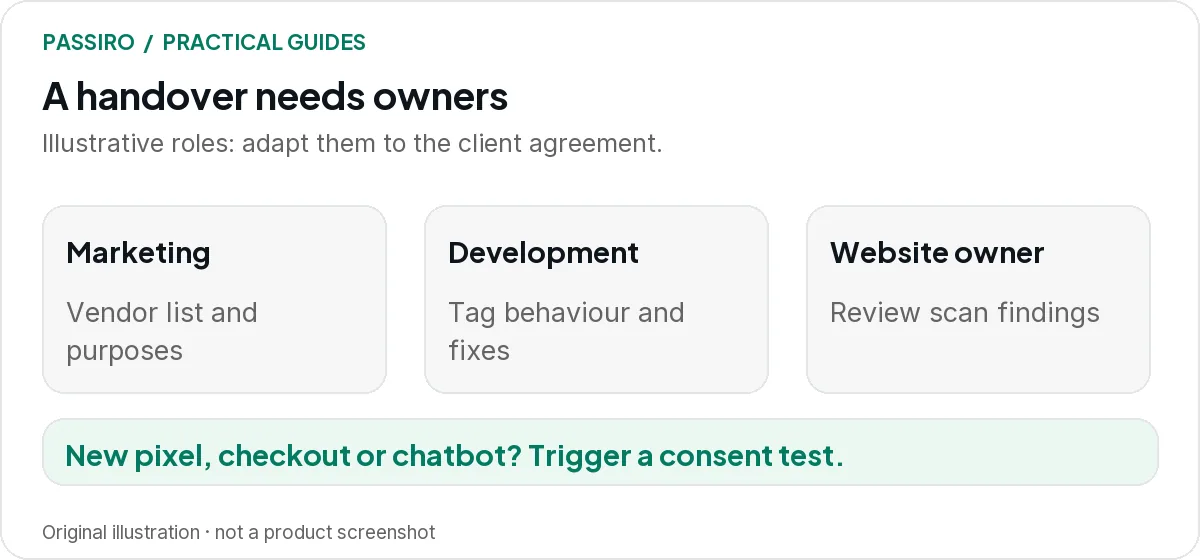
Put the result into the handover as a short note, for example: “Marketing owns the vendor list. The agency maintains tag behavior under the service agreement. The website owner reviews scan findings monthly. A new pixel, checkout or chat tool triggers a consent test before release.” Adapt the roles to the actual agreement.
If the client does not buy an ongoing service, say so in the handover. The client then owns every task in the table, and your work ends with the tested launch unless you agree otherwise.
Copy the handover template
Fill in one copy per domain and keep it with the client’s configuration. Add a line for each journey or issue if you need more space.
Cookie-consent handover
Client and domain:
Test date:
Region(s):
Consent Mode (Basic, Advanced or not used):
Journeys tested:
Expected result:
Actual result:
Issues found:
Owner:
Next check:
Keep the software price separate from your fee
Passiro Free includes unlimited visitors, team members and multi-site management, plus monthly automatic scans of up to 500 pages per scan. Paid plans are priced per domain and add defined capabilities, such as weekly scans and on-demand scans from Pro. Check the plan overview when scoping the project.
Your fee for implementation and maintenance is a separate item. Show it apart from the software subscription in your proposal, so the client can see what the software costs and what your service covers.
Two quick questions
Is the client automatically compliant after the handover?
No. The checks help establish and document the setup. Applicable requirements, future website changes and the client’s data practices still need an owner.
Who should hold the Passiro account?
Agree it in the handover. Because each person can have their own login and role, the client can hold the account and invite the agency, or the other way round, without sharing credentials. Record who removes access when the service ends.