


Adding an AI chatbot? Check these 5 data flows before launch
An AI chatbot can answer a product question while your team is busy. It can also introduce a new vendor, new browser requests and a new place where customers type personal information.
Before launch, inspect what loads on arrival, what happens when someone opens the chat, where messages go, how long they are kept and whether data is reused. Your browser shows part of that picture. The rest depends on the vendor’s settings and contract, so this guide keeps the two apart.
This guide uses a fictional online shop adding an assistant to answer delivery questions. The workflow is illustrative, not a claim about a specific chatbot provider.
1. What loads before anyone opens the chat?
Install the widget in a test environment and visit the page without interacting. Inspect the browser’s requests and storage. The small chat icon may arrive with analytics, identifiers or services you did not expect.
Ask the supplier which components are required to display the button and which support optional measurement or advertising. Do not categorise the whole integration as necessary merely because the team wants a chatbot.
The browser test further down shows how to record this with developer tools and a website scan. Compare what you observe with the supplier’s documentation.
2. What changes when a visitor opens it?
Clicking “Chat” can load a new frame, establish a session or introduce a separate service. Repeat the inspection at this point.
In our fictional shop, the team chooses a lightweight launcher and loads the conversational service when requested. That is a design choice to reduce unnecessary loading; it is not, on its own, a determination that every resulting cookie or data use is exempt from consent.
For UK sites, use the ICO’s current guidance on storage and access exceptions to assess the relevant conditions. Do not automatically apply a UK exception to EU markets.
3. Where does the message go?
A delivery question may contain an order number, email address or home address. Follow that message beyond the browser: chatbot vendor, model provider, support platform and any internal logs.
Ask for the actual processing arrangement, not only a statement that the tool is “secure”. If personal data is involved, the GDPR requires attention to matters such as lawful basis, transparency, processor arrangements and international transfers where applicable.
Give visitors a short explanation before they submit information. Where possible, design the experience so they do not need to type sensitive details into a general chat box.
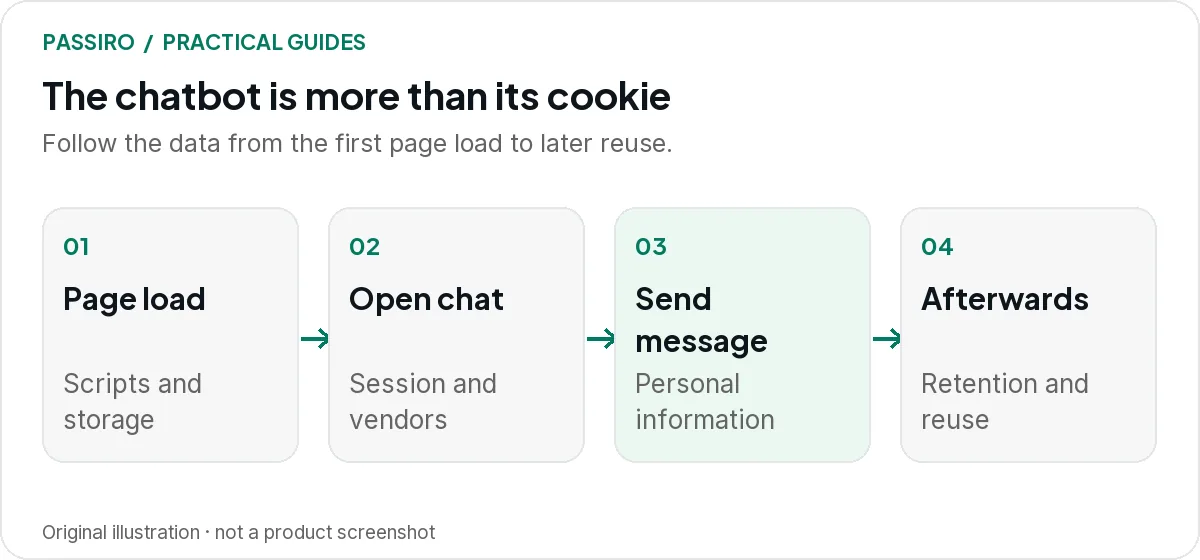
4. Is the conversation used for anything else?
Separate providing the answer from improving the vendor’s models, product analytics and marketing. Ask which uses are enabled by default and whether they can be disabled.
In the fictional shop, the assistant needs a delivery postcode to answer one question. It does not follow that the same conversation should populate an advertising audience or be retained indefinitely for model training.
Record the intended purposes and the vendor settings that implement them. Keep a copy of the relevant configuration so a later account change can be checked against it.
5. What happens after the conversation ends?
Confirm retention, deletion, access controls and the route for handling privacy requests. Find out whether deleting a conversation in the dashboard also removes it from connected systems, backups or model-provider logs under the applicable arrangements.
Test with synthetic information, not a real customer’s details. Submit a sample deletion request, follow it through the agreed process and record which systems need action.
Test the widget in your browser
This test covers what happens on your website: the scripts the widget loads, the requests it sends and what it stores in the browser. Use synthetic data throughout, such as a made-up order number and an example.com email address.
| Check | What it shows | What it cannot show |
|---|---|---|
| Website scan | What it showsCookies and third-party scripts found on the pages the crawler reached | What it cannot showWhat loads only after opening the chat or sending a message |
| Network panel | What it showsWhich domains receive requests at each step, and what the requests contain | What it cannot showWhat the vendor does with the data after it arrives |
| Application panel | What it showsCookies, local storage and session storage for each origin, including the chat frame | What it cannot showRetention or reuse on the vendor’s servers |
| Consent journeys | What it showsWhether the widget follows each choice made in your banner | What it cannot showWhether the vendor’s contract and settings match your purposes |
Run the browser test in this order:
- Open a fresh private window with developer tools already open, then load a page with the widget. Do not interact yet.
- In the Network panel, filter by the chat vendor’s domain, then note every other domain that receives requests. In the Application panel, note cookie and storage names rather than their values, which can contain identifiers.
- Repeat the recording after rejecting optional cookies, after opening the chat and after sending a synthetic message.
- Check that the message goes only to the domains you expect, and that no analytics or advertising domain receives chat events you did not plan for.
- Change your consent choice after the chat has loaded, then return with a saved choice, and record whether the widget follows it.
Chrome’s guides to the Network panel and to viewing cookies explain the tools. Look beyond cookies: the EDPB’s guidelines on the technical scope of Article 5(3) of the ePrivacy Directive also cover techniques such as tracking pixels and URL tracking.
What a website scan adds
After deployment, run a new scan and open Cookies Detected. Review the vendor’s cookies, then open its row under Detected Trackers & Third-Party Scripts to see the requests found. Treat anything marked Unknown as a question for your developer, not as necessary by default.
A scan reports what the crawler found on the pages it reached. Scripts that load only after someone opens the chat or types a message may need the manual browser test above. If the widget depends on optional consent, check automatic script blocking and give visitors a clear way to reopen cookie settings, rather than relabelling the chat as necessary.
Neither the banner nor the scan documents how the vendor processes conversations once they leave the browser. They help you control and record the website side; the vendor’s processing needs the questions below.
Questions to send the chatbot vendor
Contracts and the handling of conversation data are a separate review from the browser test. Send the vendor these questions in writing and keep the answers with your configuration notes.
Chatbot vendor checklist
Data fields collected (messages, metadata, identifiers, attachments):
Recipients and model provider:
Default settings for model training and other reuse:
Retention period for conversations and logs:
Deletion in connected systems (support platform, CRM, backups, provider logs):
Access control (who can read conversations, at the vendor and in our team):
International transfers and the safeguards used:
Compare the answers with the contract, the processing terms and the vendor’s actual account settings. If an answer and a setting disagree, resolve it before launch rather than relying on the cookie banner to cover it.
Keep the chatbot in your regular checks
Add the widget to the website’s inventory and repeat the browser test after vendor updates, new features or a change of model provider. Use the cookie-banner test guide for the wider consent journeys and the Support Center routine for adding a new tracking tool.
Two quick questions
Does every chatbot need marketing-cookie consent?
No universal answer fits every integration. Review each purpose, technology and applicable rule. A requested chat service and optional advertising activity should not be bundled together by default.
Can a cookie banner make an AI chatbot compliant?
No. It can help control relevant scripts and record consent choices. Vendor contracts, conversation data, retention and other applicable AI or privacy requirements need a separate review.