
Conversions dropped after a cookie-banner change? Check these 7 things first
The new banner went live on Monday. By Thursday, Google Ads showed fewer conversions. Should you reverse the release, increase the budget or pause the campaign?
 Passiro
Placeholder[PUBLICATION DATE: set when published]
Passiro
Placeholder[PUBLICATION DATE: set when published]
Start by separating a business change from a measurement change. Compare the underlying orders or qualified leads with the advertising report, then inspect consent signals and conversion events. A drop after a banner change is a useful clue, but timing alone does not establish the cause.
This guide is for marketers using GA4 and Google Ads. Work through it with the person who owns the implementation before making a large budget decision.
1. Check whether sales or leads actually fell
Use your order system or CRM to establish the business outcome. Match the time period and account for refunds, cancellations, duplicate leads and the difference between a submitted form and a qualified opportunity.
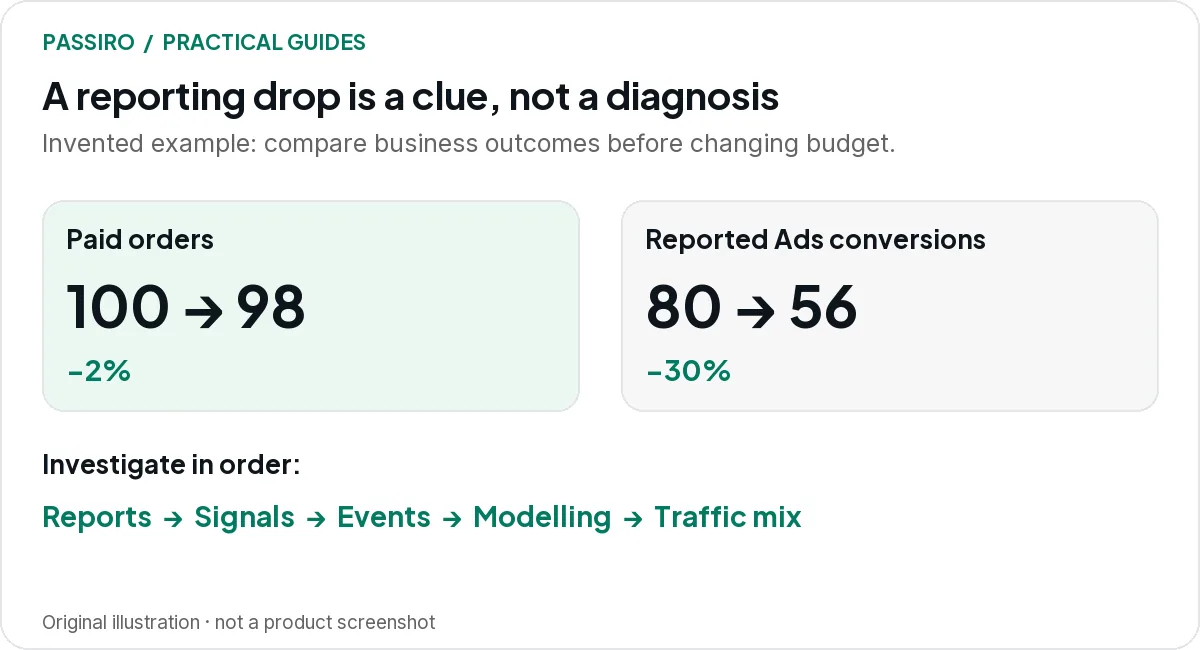
Illustrative example: a shop has 100 paid orders before the release and 98 after it, while Google Ads conversions fall from 80 to 56. Reported conversions fell 30%; paid orders fell 2%. Those numbers do not prove a tracking fault, but they justify investigating measurement before blaming demand.
The example is simplified and invented. In real analysis, compare equivalent periods and account for other changes such as spend, promotions and traffic mix.
2. Make the reports comparable
Check conversion definitions, date attribution, time zones, attribution windows and reporting delays. Confirm that the same conversion action is selected and that its primary or secondary status has not changed.
GA4 and Google Ads do not have to show identical totals. Google's GA4 reporting-identity guidance explains how identity options affect the way users are represented, including modelling in eligible blended reporting.
Write down the comparison you are making. “Sales are down in analytics” is not precise enough to debug.
3. Inspect defaults and updates
Open a fresh session with Tag Assistant and inspect the consent timeline. Confirm the intended default state, then accept, reject and change preferences in separate test journeys.
Look at all four key v2 signals. A missing update can leave tags in a denied state even after a visitor grants the relevant permission. An incorrectly granted default is a different problem and should not be treated as a way to restore reporting volume.
Use Google's consent-debugging guide to check the sequence. Compare the observed result with the mapping agreed for your banner.
4. Confirm whether Basic or Advanced changed
A release can accidentally change which tags load before consent. Someone may also have added a blanket block to a configuration that previously used Advanced mode.
Find out which behaviour was intended before changing it again. Ask the implementation owner to show a fresh visit and a rejected visit. Our Basic versus Advanced guide explains what you should expect in each.
Do not switch to Advanced merely to make a chart rise. That choice changes data handling and needs to match the site's requirements.
5. Test the event after a real interaction
Allow the relevant consent, then complete a test purchase or lead submission. Does the event fire once, reach the intended destination and contain the right value?
Inspect pages outside the main site too. A checkout, booking tool or form on another domain may have a separate implementation. A tag can also miss the first eligible event if it waits for a trigger that already happened before consent changed.
Give the developer the specific failure: the page, the choice, the interaction and the expected event. That is more useful than asking them to “fix Consent Mode”.
6. Separate implementation from modelling eligibility
In Google Ads, check whether Consent Mode is implemented and whether modelling is active. These are distinct states in the conversion diagnostics.
For GA4 behavioural modelling, review the property's eligibility separately. Google's current requirements include at least 1,000 events per day with analytics_storage denied for at least seven days, and at least 1,000 daily users sending events with analytics_storage granted for at least seven of the previous 28 days. Meeting thresholds does not guarantee eligibility; model quality also matters.
A smaller property may therefore have a correct implementation without the modelled reporting someone expected. Do not promise that waiting a week will fix every account.
7. Review consent choices and traffic mix
If the technical setup behaves as intended, compare banner interactions across equivalent audiences. A campaign sending more mobile traffic or visitors from another market can change the pattern of consent choices.
Check the banner itself for broken controls, unreadable text or an accidental layout change. Correcting a misleading old design may also reduce acceptance. Restoring a dark pattern is not an acceptable measurement fix.
Keep the denominator clear. “Acceptance among people who interacted” and “acceptance among all banner impressions” are different measures. Record which one you are comparing, then investigate the segment that changed.
A short incident note beats a long email chain
Capture the release time, the affected report, the business-system comparison, the failing test and the owner. Add the verified repair and the follow-up period once complete. If the underlying issue is a duplicate tag or missing update, the next person should be able to recognise it quickly.
Two quick questions
Should I add estimated missing sales to Google Ads conversions?
No. Do not manually top up a reported total with an assumed loss or add modelling again when the report already includes it. Keep any separate planning scenario explicitly labelled.
Can a new cookie banner improve ROAS?
It can change measurement and the signals available to eligible advertising systems. That is not a guaranteed improvement in actual revenue or profit. Evaluate business outcomes and measurement quality separately.
Passiro includes consent analytics and Consent Mode v2 on Free, giving you tools to review choices without a traffic-based bill. Pair them with verified events and careful reporting. Get Started.